
一键支付
# 对接流程
# 签约流程
签约流程如下:
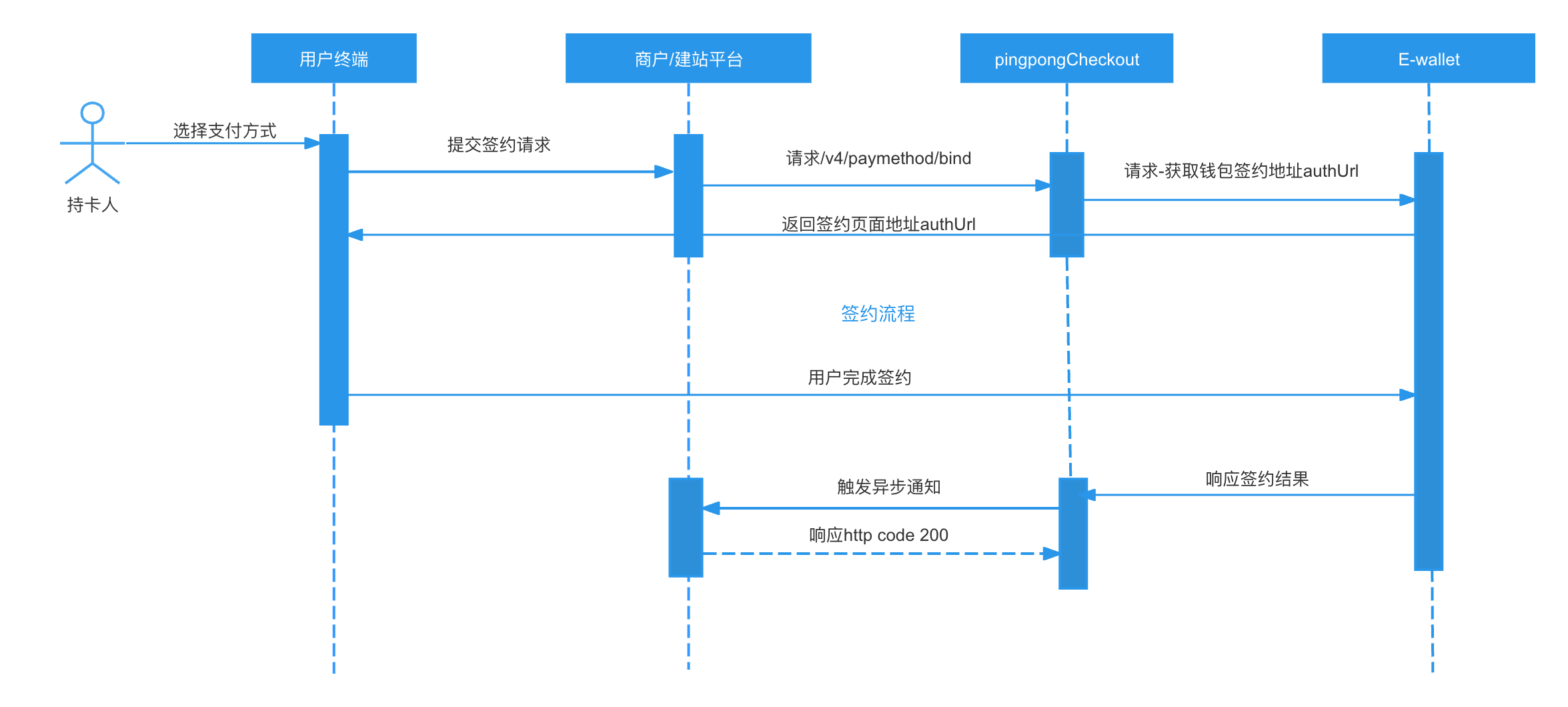
开发者调用签约接口获取钱包签约地址authUrl,用户访问authUrl完成签约,触发签约成功异步通知,获取支付凭证token。
# 解约
发起解约有两种情况:
- 商户端调用API进行解约
- 钱包用户可以在钱包侧解约。
以下是需要集成的API清单
如果需要解约,可以调 解约接口 ,取消之后token将会失效。
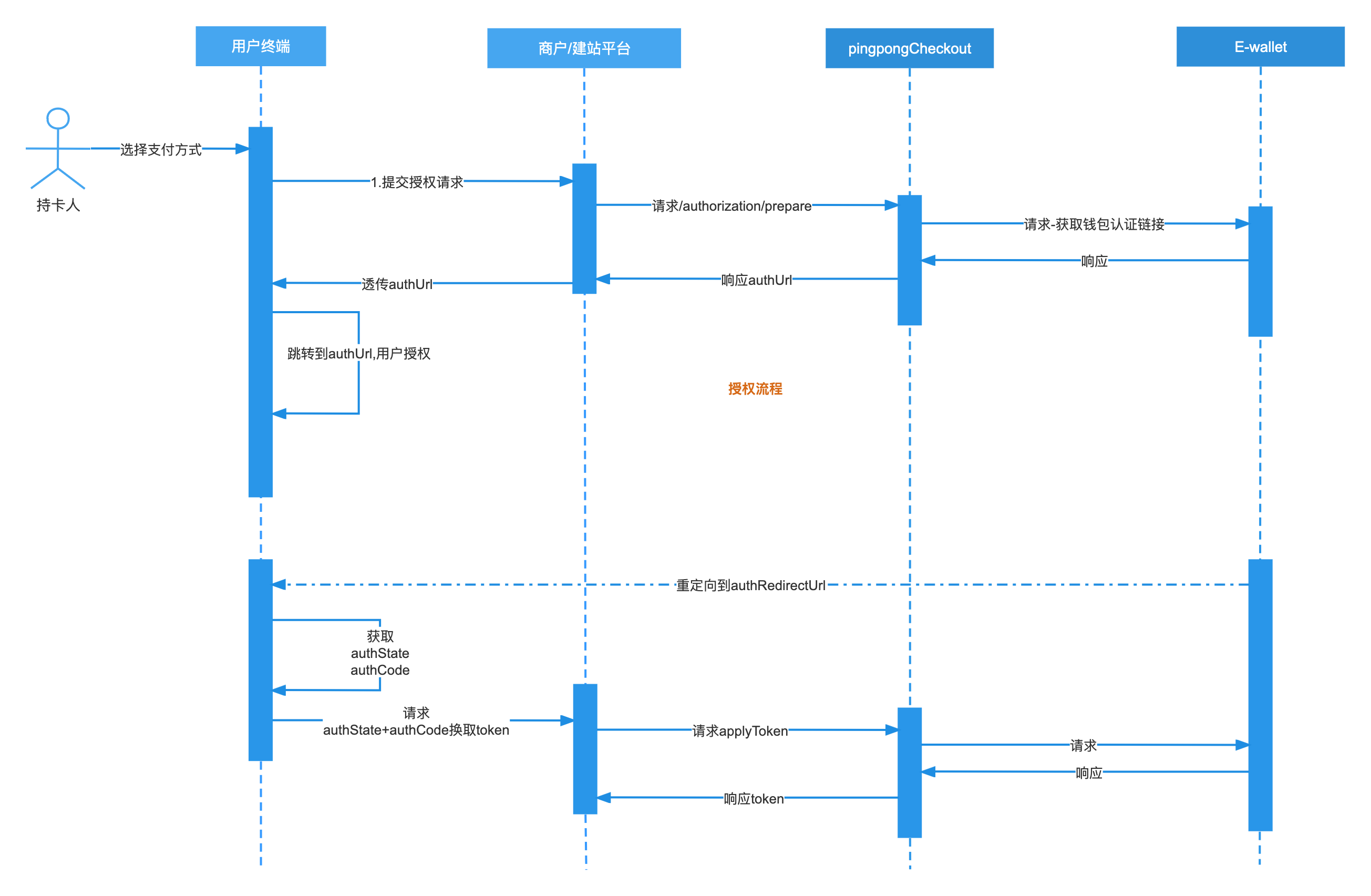
# 授权流程(旧版,计划在未来版本移除)
以下是需要集成的API清单
# 取消授权(旧版,计划在未来版本移除)
发起取消授权有两种情况:
- 商户端调用API取消授权
- 钱包用户可以在钱包侧取消授权。
以下是需要集成的API清单
如果需要取消授权,可以调 取消授权接口 ,取消之后token将会失效。
# 支付流程
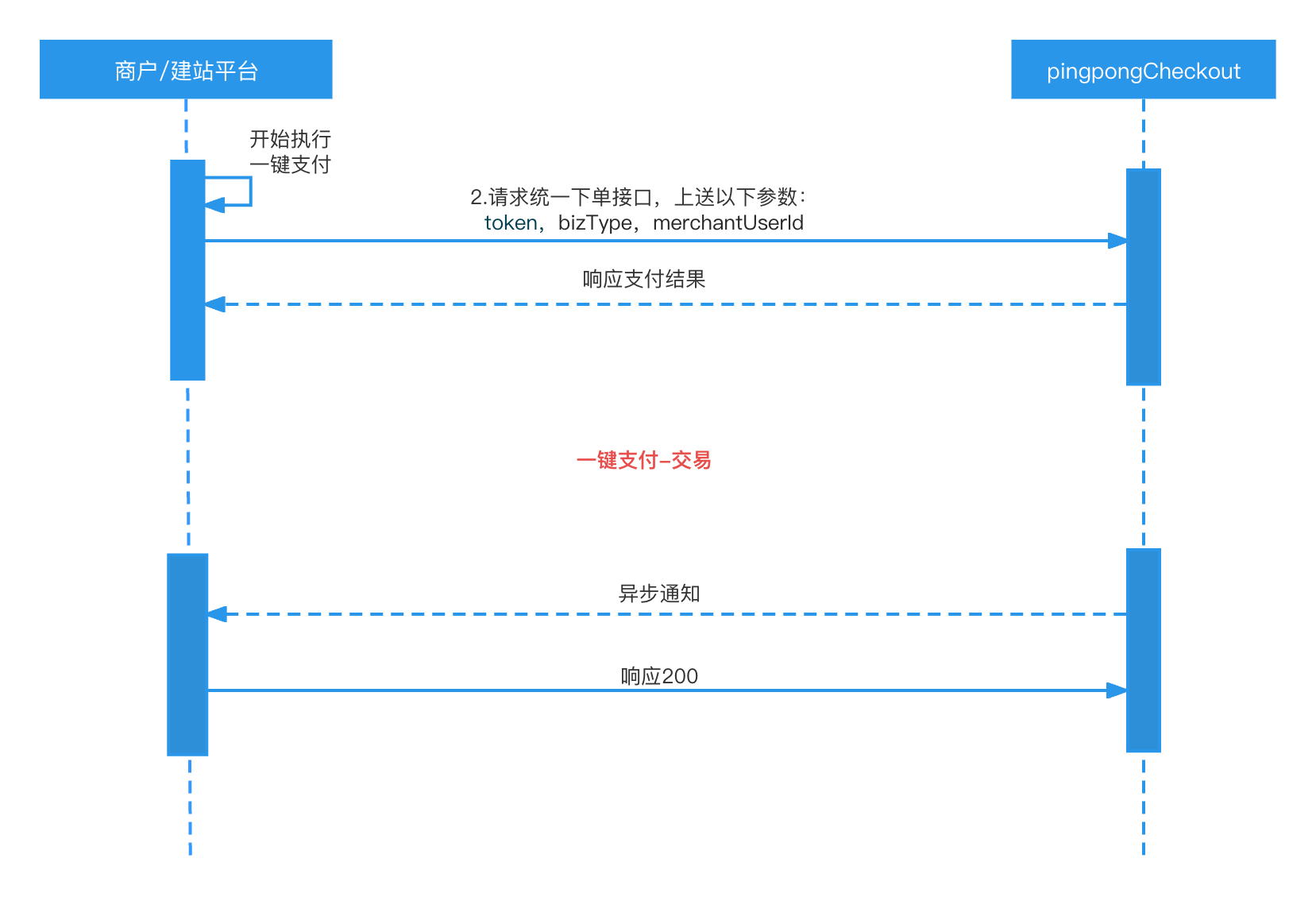
以下是需要集成的API清单
调 下单并支付接口 传入token,bizType和merchantUserId。
# 关键入参:
| 参数名 | 类型 | 是否必填 | 描述 |
|---|---|---|---|
| token | String | M | 已有字段,传授权或者签约完成获取的token |
| bizType | String | M | 已有字段,新增类型标识认证授权,固定传"CodeGrant" |
| merchantUserId | String | M | 会员ID,用户在商户网站的会员ID |
调用下单并支付接口的时候入参中必须要传入merchantUserId,并且要和认证的时候传入的merchantUserId一致,否则会报错token不存在
下单并支付接口入参示例如下:
{
  "accId": "2023042011040310224447",
  "clientId": "2023042011040310224",
  "signType": "SHA256",
  "sign": "{{Sign}}",
  "version": "1.0",
  "bizContent": {
    "captureDelayHours": 0,
    "amount": 100,
    "currency": "HKD",
    "requestId": "{{requestId}}",
    "payResultUrl": "https://www.baidu.com",
    "notificationUrl": "https://test-acquirerpay.pingpongx.com/qa/notify",
    "merchantTransactionId": "{{merchantTransactionId}}",
    "shopperIP": "192.168.1.1",
    "token": "7dda0a6f6958105204fd6637001f900efd9b3168c948b68b6f7f2bf063eadf97",
    "bizType": "CodeGrant",
    "merchantUserId": "126048960513465",
    "paymentMethod": {
      "type": "AlipayHK"
    },
    "customer": {
      "email": "pass@pingpongx.com"
    },
    "device": {
      "orderTerminal": "02"
    }
  }
}
1
2
3
4
5
6
7
8
9
10
11
12
13
14
15
16
17
18
19
20
21
22
23
24
25
26
27
28
29
2
3
4
5
6
7
8
9
10
11
12
13
14
15
16
17
18
19
20
21
22
23
24
25
26
27
28
29
其他同现有APM支付参数即可
# 异步通知
注意
- 当http code 为200的时候,表明商户已经收到报文,商户无需返回额外信息。
- 响应报文异常重试2次
# 签约异步通知
以下三种情况会触发异步通知:
# 授权异步通知(计划在未来版本移除)
以下三种情况会触发异步通知:
上次更新: 2024/05/24, 15:44:15