
Refund
Refund refers to the process where merchants return part or all of the transaction amount to shoppers after a transaction has been completed (i.e., after funds have been transferred from the shopper's account to the merchant's account). You can issue full refunds or partial refunds. You can also perform multiple partial refunds as long as the total amount does not exceed the captured amount. Refund is a common "modification" operation in the payment field that directly affects the status of authorized or captured payments and ensures funds can be safely returned to the shopper's account.
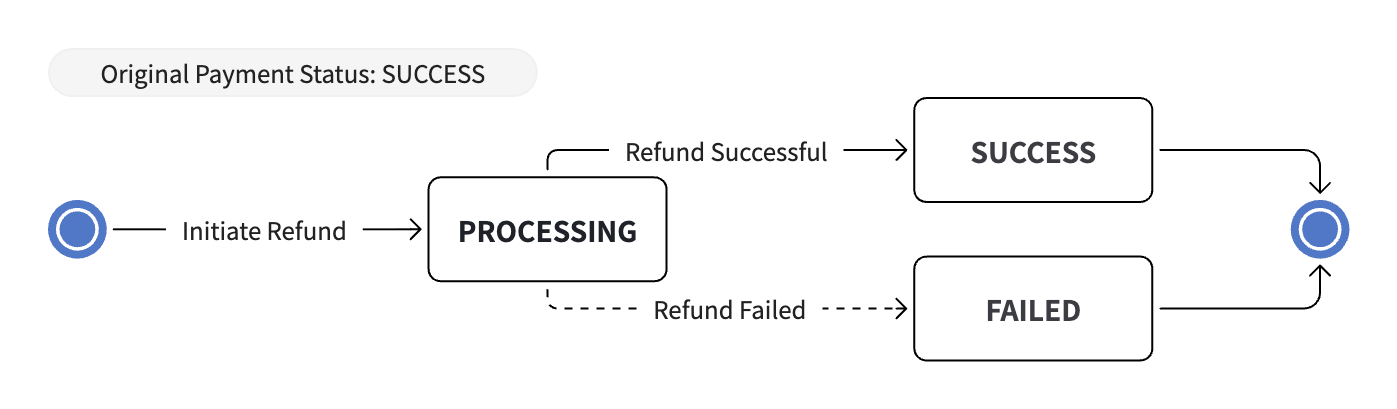
Refund State Machine
Refund is an independent post-payment operation. The original payment must already be in SUCCESS status. A successful or failed refund does not change the original payment status; use merchantRefundId or refundId to track the refund object's status.
Initiating a Refund
Request the apply refund API to initiate a refund.
Note
- For manually captured transactions, you can only refund after the payment has been captured. If you want to cancel a payment that has not yet been captured, you can use Void.
- When you cannot confirm whether the original transaction has already been captured, you can call Single Transaction Query.
- Refunds have time limits; you can initiate refunds within a certain period, and refunds cannot be initiated beyond this period.
Handling Refund Status
After calling the apply refund API, you may receive optional status values in the synchronous response:
SUCCESS- SuccessFAILED- FailedPROCESSING- Processing
To handle the PROCESSING situation, you need to properly set the notificationUrl when calling the apply refund API to correctly receive refund notifications
In the refund notification flow, status returns the final refund result, which is either SUCCESS or FAILED.
Note
When you don't receive asynchronous notifications or cannot confirm the status, you can call Refund Query. In the refund query response, status can return SUCCESS, FAILED, or PROCESSING.
Multiple Refunds and Partial Refunds
The apply refund API is idempotent based on merchantRefundId, allowing you to safely call it multiple times.
Note
Currently partial refunds are supported, and the total refund amount must equal the transaction amount
- When
merchantRefundIdis the same, re-calling the apply refund API will return query results. - When you need to retry after failing to call the apply refund API, you need to update the
merchantRefundIdto re-initiate the request. - If you want to issue a partial refund, pass a refund amount less than the payment amount in the apply refund API.
- For scenarios supporting multiple refunds with different amounts, you need to update the
merchantRefundIdto re-initiate the request.